# Improve customer service with OpenAI ChatGPT
Business Robots Ai integrated with ChatGPT to allow businesses to improve their customer service while drastically saving costs and human resources.
Businesses can train ChatGPT to respond to any customer questions related to their business. A chatbot enables businesses to respond instantly to their customers around the clock, resulting in heightened customer satisfaction. Moreover, it is a cost-effective solution, reducing the need for additional human resources in customer support operations.
The key to creating an excellent chatbot for your business is to create a good prompt (Business Information). The brain of your chatbot is your prompt. Your prompt must be clear and well-written.
**Connect OpenAI to** Business Robots Ai
1 – Get your OpenAI API Key [HERE](https://beta.openai.com/account/api-keys).
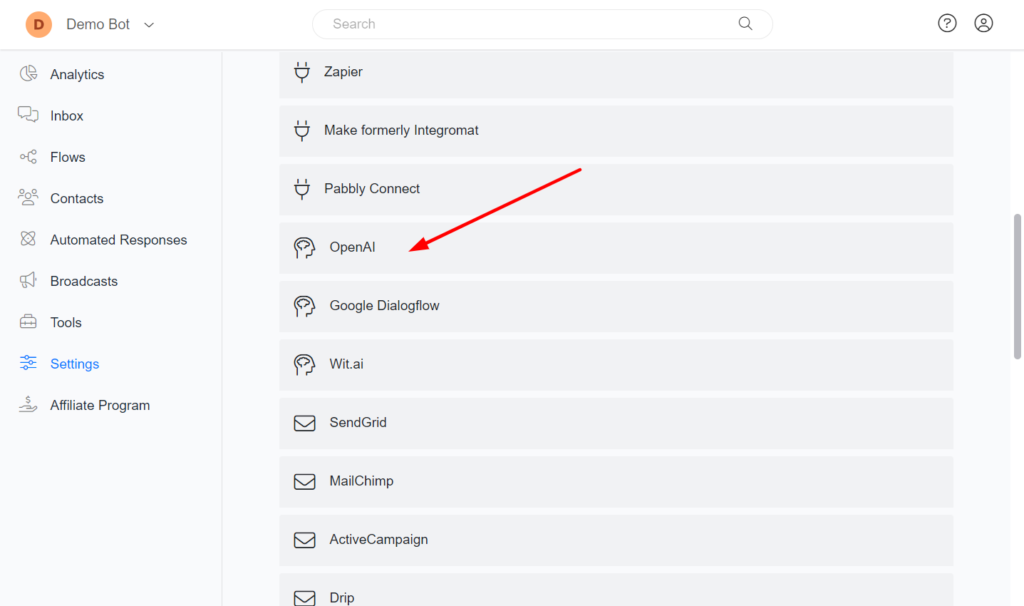
2 – Go to Business Robots Ai > Settings > Integrations > OpenAI
3 – Click the **Connect** button and provide your **API KEY**.
**Triggering a flow**
To learn how to trigger a flow using AI
**Transfer a conversation to a human**
We implemented a built-in AI trigger that automatically stops the bot automation and transfers a conversation to a human when the user wants to talk with a human agent.
**Priority of automation**
Once you connect the OpenAI to Business Robots Ai, your chatbot will automatically communicate using AI every time a user sends a message to your chatbot. No actions are required on your side.
1 – Automated Responses.\
2 – Dialogflow\
3 – OpenAI\
4 – Google Gemini
**Disable automatically triggering ChatGPT**
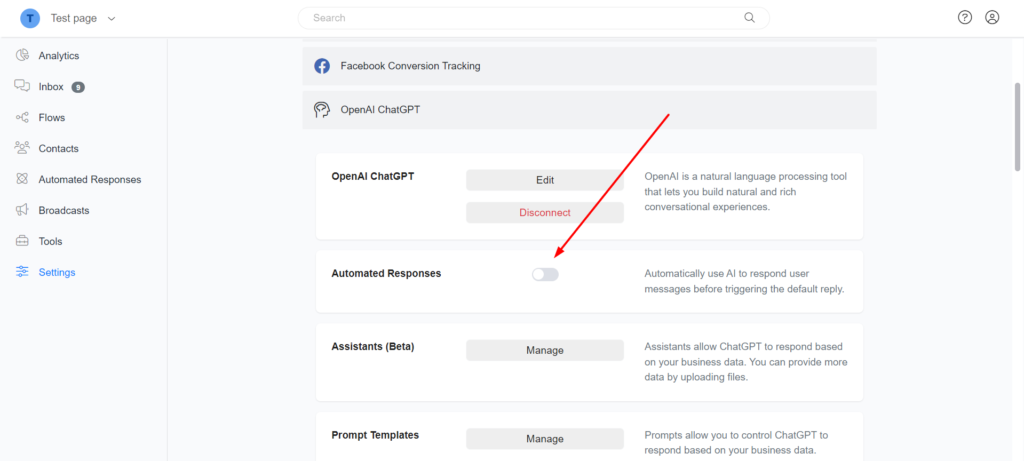
Every time a user sends a message to your chatbot, your chatbot will automatically use ChatGPT to respond to the user’s message. You may want to work with only OpenAI actions on the flow builder. You can disable this behavior by going to **Settings** -> **Integrations** -> **OpenAI** and disabling the **Automate Responses** option.
---
# Agent Instructions: Querying This Documentation
If you need additional information that is not directly available in this page, you can query the documentation dynamically by asking a question.
Perform an HTTP GET request on the current page URL with the `ask` query parameter:
```
GET https://docx.businessrobots.ai/improve-customer-service-with-openai-chatgpt.md?ask=
```
The question should be specific, self-contained, and written in natural language.
The response will contain a direct answer to the question and relevant excerpts and sources from the documentation.
Use this mechanism when the answer is not explicitly present in the current page, you need clarification or additional context, or you want to retrieve related documentation sections.