

How to get user’s location on WhatsApp, Viber and Telegram
Estimated reading time: 1 min
Business Robots Ai provides an excellent tool to quickly request and get your customer’s location via Facebook Messenger, WhatsApp, Viber, and Telegram channels, as you need to get your customer’s location at one point or another in the customer journey. Business Robots Ai provides two system fields you can use to perform actions on the contact’s geological data.
To get the user’s location, follow the steps below
Request the user’s location
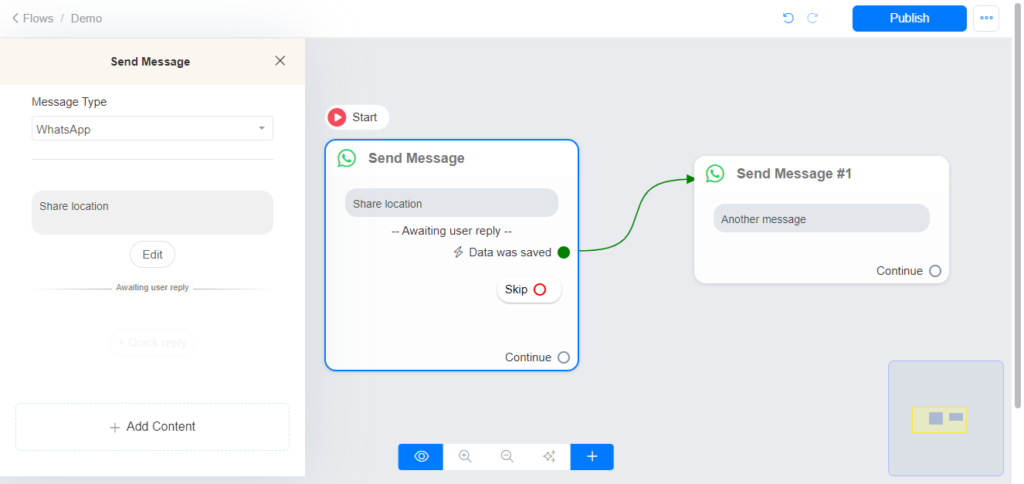

Once the user shares his/her location, the user’s entire geographical data (location) will be saved in the custom field you used on the Get User Data block.
You can access the entire geographical data (location) in the custom field you used on the Get User Data block (You can access both latitude and longitude)
You can access the ‘latitude’ of the last location the user/contact shared on {{last_latitude}}
You can access the longitude of the last location the user/contact shared on {{last_longitude}}
Advance
To get the URL of the user’s location, use the Url below
https://www.google.com/maps/search/?api=1&query={{last_latitude}}%2C{{last_longitude}}
Note: The URL will work based on the last location shared by the user/contact.
To ensure accuracy, validate the latitude and longitude values before generating the URL. Use this approach to verify that the coordinates are within acceptable ranges:
Latitude must be between -90 and 90.
Longitude must be between -180 and 180.
If the values are valid, proceed to create the URL. If they are not, prompt the user to input correct coordinates.
This method helps maintain the integrity of the location data and provides a reliable way to access and share location information with users.
Last updated